Showing posts with label Algorithms. Show all posts

Sorting algorithms 4 - Quick sort

Like merge sort, quick sort is also better than bubble,insertion and selection. Quick sort also uses divide and conqueror approach like merge sort. The basic idea behind in quick sort is that divide array using a pivot element and sort the sub arrays. Unlike merge sort, quick sort is memory wise efficient.
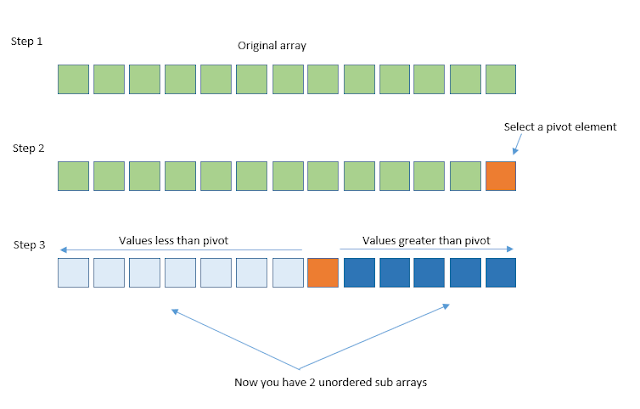
Process

  • In step  you have the original unsorted array.
  • In step 2 select a pivot element. It can be any element in the array, most probably from somewhere middle. But in this case we'll use the last element.
  • Now reorganize the array such that values less than pivot is in the left side and values greater than pivot are in the right side.
  • Now if you just forget about the pivot , what you have is 2 unorderes sub arrays. So you have the same problem in the step 2. So you can now use recursively do the same stpes until you have a one element. Because when you have one element it is also sorted.
  • If you do this until there are no sub arrays left, that means you have a sorted array.

Quick sort - Java implementation

 
public static void quickSort(int[] a, int start,  int end)
{
  if(start < end) {
  
  int pIndex = partition (a, start, end);
  
  quickSort(a, start, pIndex- 1);
  quickSort(a, pIndex+1, end);
  }
 }

 private static int partition(int[] a, int start, int end) {
  //Pivot can be any index.
  // In this case we choose it as the final element
  int pivot = a[end];
  
  int partitionIndex = start;
  
  for(int i = start ; i<=end -1; i++)
  {
   if(a[i] <= pivot){
    int temp = a[i];
    a[i]=a[partitionIndex];
    a[partitionIndex] = temp;
    
    partitionIndex = partitionIndex + 1;
   }
   
  }
  
  int temp = a[partitionIndex];
  a[partitionIndex]=a[end];
  a[end] = temp;
  
  return partitionIndex;
  
  
 }
Share:

Sorting algorithms 4 - Merge sort

Merge sort is faster and efficient than bubble,insertion and selection sorts. But it is not efficient than quick and shell sorts. Time wise merge sort is efficient but this comes with a penalty. That is we need more additional space for merge sort. The basic of merge sort is partition the array in to smaller pieces using recursion and merge them so that you will have a sorted array.


Process

  • Choose a pivot element to partition. Typically middle element of the array is better.
  • Create 2 sub arrays left and right. Size of left and right should be 0 to middle and middle to original array element size.
  • Fill left and right sub arrays from the original array.
  • Recursively do these steps until you have sub arrays of singe element. Which means the base case for recursion is sub array elements should not be less than 1.  
  • When you have single elements you can start merging them to get a sorted array.Partitioning until single elements happens because single elements are already sorted.
  • Now we can compare elements from left array and right array.
  • Until left array elements or right array elements are over, compare them and insert the least element to the array. 
  • When one array is over you can add remaining arrays elements to the sorted array in a sorted order.
  • Tada ! you have a sorted array.


 public void mergeSort(int[] a) {
  int n = a.length;

  // Base case for partitioning
  // Array with single element is already sorted
  if (n == 1)
   return;

  int middle = n / 2;
  // Create sub arrays
  int[] left = new int[middle];
  int[] right = new int[n - middle];

  // Fill sub arrays
  for (int i = 0; i < middle; i++) {
   left[i] = a[i];
  }
  for (int i = middle; i < n; i++) {
   right[i - middle] = a[i];
  }

  // recursively partition until 1 element is there
  mergeSort(left);
  mergeSort(right);

  // Merge sub arrays
  Merge(left, right, a);

 }

 public void Merge(int[] left, int[] right, int[] a) {

  int leftArrItems = left.length;
  int rightArrItems = right.length;

  // i for left array looping
  // j for right array looping
  // k for a array looping
  int i = 0;
  int j = 0;
  int k = 0;

  while (i < leftArrItems && j < rightArrItems) {

   // Decides from what sub array to pick to fill final array
   if (left[i] < right[j]) {
    a[k++] = left[i++];
   } else {
    a[k++] = right[j++];
   }
  }

  // Just in case if any sub array is left over
  // with additional elements
  while (i < leftArrItems) {
   a[k++] = left[i++];
  }
  while (j < rightArrItems) {
   a[k++] = right[j++];
  }

 }

Share:

Sorting algorithms 3 - Insertion sort

Just like bubble and selection sorts, insertion sort is also a simple yet inefficient sorting algorithm on large data sets.


Process

  • Lets take a hypothetical moment where the unsorted array we want to sort is partially sorted.
  • So the left part is sorted in ascending order and right part is not yet sorted.
  • we will mark first element in the unsorted part as out. That indirectly says that the last element in sorted portion we can mark as in-1, if we say in = out
  • So now,we can take in-1 th element and move sorted portion until we find a place to put in-1.
  • When that happens, unsorted portion decreases by 1. That means out decrements by 1 and sorted portion increases by  1 position.
  • The data structure is sorted when out goes from 1 to length of the data structure.

// Insertion sort implementation
 public int[] insertionSort(int[] array) {

  for (int out = 1; out < array.length; out++) {
   int in = out;
   int temp = array[out];
   
   while (in>0 && temp<= array[in-1]){
    //move sorted portion to have some space to array[in-1]
    array[in] = array[in-1];
    in --;
   }
   
   array[in] = temp;
  }

  return array;
 }
Share:

Sorting algorithms 2 - Selection sort

Selection sort is also like bubble sort. It uses another different approach for sorting comparing to bubble sort. But when it comes to sort large volumes of data it is inefficient yet good,easy,adaptive for small volume of data.


Process

  • Lets say we want to sort an unsorted array in ascending order. Meaning largest data on right hand corner.
  • Lest select in th element as the minimum
  • Now from in+1 th element to out element I'm searching a value that is lower than the selected minimum value.
  • If I found a such value that means there is a minimum value than our selected minimum value.
  • So I will swap the initially selected minimum and newly found minimum,
  • Now the minimum is on the left.
  • Now we can worry about the array starting from in+1 to out.
  • Select minimum as in+1 and repeat the above procedure until in gets to out.

 // Selection sort implementation
  public int[] selectionSort(int[] array)
  {
   
   int out = array.length - 1;
   for (int in = 0; in < out; in++) {
   
    int min = in;
    
    for (int j = in+1; j < out + 1; j++) {
    
     if (array[min] > array[j]) {
      
      min = j;
    }
   }
    
    int temp = array[in];
    array[in] = array[min];
    array[min] = temp;
  }
   
   return array;
  }
Share:

Sorting algorithms 1 - Bubble Sort

Bubble sort is one of the simplest and easiest of sorting algorithms available. But bubble sort is has almost no practical usage because it is inefficient to sort large volumes of data. Then again bubble sort is good easy solution for simple low volumes of data.


Process

  • Lets say we want an array of ascending order. Meaning largest element in the right corner.
  • First take first element. That is [in] th element according to the figure above.
  • Then compare[in] and [in + 1] th element.
  • If in > in+1, we have swap these two. Because we want to move the largest element of this array to the right hand corner.
  • We have to do this untill, in=0 to in<out. When this first pass is over, largest element is on out.
  • So now we have to take care of the array, starting from in=0 to out-1.
  • So in each pass next largest value goes to right hand corner and out decrements by 1.
  • When out reaches 1, that means the array is sorted.

 /*
  * Bubble sort implementation
  * 
  * Input: unsorted array
  * Output: sorted array
  * 
  * 
  * */
  
  public int[] bubbleSort(int[] array)
  {
   
   for (int out = array.length - 1 ; out > 1; out --) {
    
    for (int i = 0; i < out; i++) {
     
     if (array[i] > array[i+1])
     {
      //swap
      int temp  = array[i];
      array[i] = array[i+1];
      array[i+1] = temp;
     }
    }
   }
   
   return array;
   
  }


Share:

Data structures and Algorithms overview

In order to proceed with DSA (Data structures and Algorithms) you have to have some basic programming background. It is not always the case. You  can learn the concepts of DSA prior to learning programming. But personally I do not recommend the latter. Just an personal opinion. Lets understand the things very simply. ;)


Data structure 

Normally in a computer program, no matter in what language you write it we need data to work with. These data can be variables (int x= 25, String firstName = "kalpa" , boolean isSignedIn = false) or data that we store in a database (may be in an xml file , database like mySQL or simply a text file). Amount of data and the complexity of data increase the with program scale and complexity. For example when you code a basic calculator you may need some ints doubles, floats. But when it comes to enterprise level real time banking mobile application nature of data differs. 

So not all the data are alike. These data has to be stored in some sort of manner in order to use it. Hence we need some kind of structure to hold on that data. (no matter the data is in variables or a database).


Simply saying you cant store eggs and oranges in the same manner. You need specific structures to each type. Read more about DS from here.

Algorithms

Well, the name seems cool mathematicy, cody and geeky. But in simple terms an algorithm is way of solving a problems. In day to day life we use algorithms all the time. For example when we want to tie our shoes we have certain way answering that problem. You take the shoe laces tie it in a certain fashion. VIOLA ! your shoe is laced. :D all the time, in every nook and corner in the world this algorithm is the same. 
Algoithm can be simple as this

or it can be complex as this. :D

Normally algorithms are kind complex. ;)

Algorithms can be used with data structure also.
  • To insert a new data item (Adding a new orange to the orange basket basket)
  • To search for a specific data item (search a specific orange from the basket. This may take some time depending in how you have strucutred your oranges)
  • To delete a data item (get an odd yellow colored orange and throw it to garbage can.)
For more on algos read some from here


Share: