Showing posts with label Web Services. Show all posts

Creating a Java based RESTful web service (JAX-RS)

Here we will build a Java based RESTfull web service using Jersey.

Image result for what is java jersey
What is Jersey ?
Jersey is an open source framework that we can use to build RESTful web services. And furthermore it is based on standard JAX-RS framework.

So we can use just the standard JAX-RS provided by JDK also. But developing with Jersey can make you a handy person. ;)

As a start you can have a dynamic web project in Eclipse and then add .jars provided by Jersey. But the thing is Jersey jars are already in maven repository. So if you create a maven project instead of a dynamic web project, maven downloads and resolves any dependencies.

You can create a Maven project from Jersey archtype. If the related archtype is not defined you can create a arch type by providing the following.
  • artifactId=jersey-quickstart-webapp
  • archetypeGroupId=org.glassfish.jersey.archetypes
  • archetypeVersion=2.22.1 // The latest stable version available.

What is happening with Jersey ?
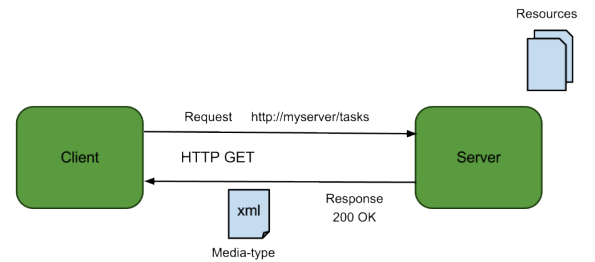

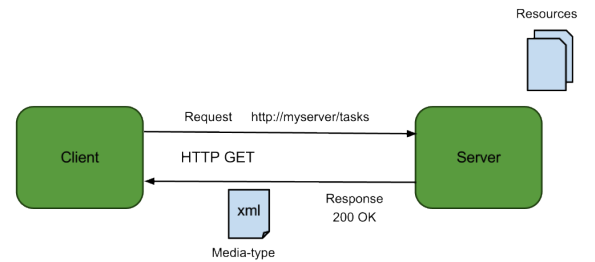
1. Client request the REST service via a valid URL(
Lets say http://host.com/AppName/webapi/myResource 
Because we can request services via URLs we dont need to create additiona hard coded REST clients, just a browser is enough. But if you wannt do much more with URLs and requests there are very very good browser plugins and extensions for chome and FireFox.

2. Application (AppName)gets the request. Actually web.xml in WEB-INF gets and handles the request.
It decides what package to look for (com.kapal.restdemo)

<init-param>
            <param-name>jersey.config.server.provider.packages</param-name>
            <param-value>com.kapal.restdemo</param-value>
</init-param>

And also it does the mapping between URL and resource classes. Here it maps webapi/ any_url_portion with com.kapal.restdemo

<servlet-mapping>
        <servlet-name>Jersey Web Application</servlet-name>
        <url-pattern>/webapi/*</url-pattern>
</servlet-mapping>

3. So the resource we need to look for is myResource.
If there is a class annotated with @Path("myResource"), Jersey will get that class.

package com.kapal.restdemo;

import javax.ws.rs.GET;
import javax.ws.rs.Path;
import javax.ws.rs.Produces;
import javax.ws.rs.core.MediaType;


@Path("myresource")
public class MyResource {

    
    @GET
    @Produces(MediaType.TEXT_PLAIN)
    public String getIt() {
        return "Got it! yeah";
    }
}


Here additional 2 annotations are needed.
@GET - respond to GET HTTP verb
@Produces - Means in what format we should send the response to client.
Typically it can be plain text, or HTML format. But sometime we may need to respond with XML format or JSON.

(MediaType.APPLICATION_XML)
With JDK we have JAXB(Java Architecture for XML Binding). So it is pretty straight foreward to convert Java objects to XML format and vice versa. All we have to do annotate the requires object class as @XmlRootElement


(MediaType.APPLICATION_JSON)
Unfortunately with JDK we dont have a inbuilt support. We need to have a 3rd party support. Jersey also has a JSON library called moxy. You can manually add the .jars or let Maven do it for you. All you need do is add the dependency by uncommenting following dependency portion in pom.xml

<dependency>
            <groupId>org.glassfish.jersey.media</groupId>
            <artifactId>jersey-media-moxy</artifactId>
 </dependency>

Share:

Calling a remote SOAP WS (JAX-WS) from a local client

Lets say a some SOAP service is hosted in a remoter server. We dont want to know its implementation logic, language, platform, server or anything. Thats the beauty of WS. You can call it from any language, platform.

If you can google you can find loads of SOAP services for free. For now I will use http://www.webservicex.net/New/. This just a random choice. This site has loads of web services.

From all of those WS I will chose http://www.webservicex.net/New/Home/ServiceDetail/17. This can basically take a countries name as a string and provide its dialing code, currency, GMT like details.

So first step is to get it's WSDL.
Which is @ http://www.webservicex.net/country.asmx?WSDL

When you look at the end of the WSDL you can see this.


Which means 
Service name = country and its is binded  port = countrySoap

Before going to have a Java client we need to have all the stubs that complies with this WSDL.
we can do that via wsimport tool by JDK. Type this in a bash.

wsimport -keep http://www.webservicex.net/country.asmx?WSDL

-keep arg can keeps the .java files with .class files. What I normally do is after all the files parsed from the WSDL remove all the .class files via rm *.class 

So in our Java main method, we can have a instance of web service and get its binded interface which is at the above mentioned port and access all the web methods via the interface.


import net.webservicex.Country;
import net.webservicex.CountrySoap;

public class Main {

	public static void main(String[] args) {

		// According to WSDL service name is country
		// Create a web service instance
		Country country = new Country();
		
		// According to WSDL this service is binded to countrySoap port
		// So get this service's port
		CountrySoap cs = country.getCountrySoap();
		
		// Now we have the access to services interface
		// We can call its services 
		// We don't need to worry about in and out parameters and data types
		// They are being handled by stubs at client and server end
		// For now lets get the dialing number for any country
		String dialing = cs.getISD("Sri Lanka");
		
		System.out.println(dialing);


	}

}


Result

IMPORTANT
Actually this WS has 2 issues.
  1. It produces the result twice per each response.
  2. The result is not a native String type. It is wrapped around a table. we have to unwrap it first.

Any how Service implementation is beyond our duty and we can call the SOAP WS regardless.


underneath the communication media request is sent as a SOAP mag and response is also received as a SOAP msg.

We request

POST /country.asmx HTTP/1.1
Host: www.webservicex.net
Content-Type: application/soap+xml; charset=utf-8
Content-Length: length

<?xml version="1.0" encoding="utf-8"?>
<soap12:Envelope xmlns:xsi="http://www.w3.org/2001/XMLSchema-instance" xmlns:xsd="http://www.w3.org/2001/XMLSchema" xmlns:soap12="http://www.w3.org/2003/05/soap-envelope">
  <soap12:Body>
    <GetISD xmlns="http://www.webserviceX.NET">
      <CountryName>string</CountryName>
    </GetISD>
  </soap12:Body>
</soap12:Envelope>
We get

HTTP/1.1 200 OK
Content-Type: application/soap+xml; charset=utf-8
Content-Length: length

<?xml version="1.0" encoding="utf-8"?>
<soap12:Envelope xmlns:xsi="http://www.w3.org/2001/XMLSchema-instance" xmlns:xsd="http://www.w3.org/2001/XMLSchema" xmlns:soap12="http://www.w3.org/2003/05/soap-envelope">
  <soap12:Body>
    <GetISDResponse xmlns="http://www.webserviceX.NET">
      <GetISDResult>string</GetISDResult>
    </GetISDResponse>
  </soap12:Body>
</soap12:Envelope>


Share:

How to consume a local SOAP web service (JAX-WS) - Implementation

Lets continue with our example from here and keep things simple and tidy.

Lets say we have a server(A local server for now. ie. localhost). It has a service to add any two numbers. So you have a client who wants to consume that ws. Meaning he frigging needs to add two numbers.

Server side implementation

Add service

You need to have the service now. So write a simple add method in dynamic web project in eclipse. Its is a good idea to add the relevant annotations coz I find it less buggy.
package controller;

import javax.jws.WebMethod;
import javax.jws.WebService;

@WebService(serviceName="MyCalc")
public class Calculator {

 
 @WebMethod
 public int add(int num1, int num2)
 {
  return num1 + num2;
 }
}

WSDL creation

Create a new web service in the same project and create as follows.You can create the WSDL from your add implementation Or you can create the WSDL manually according to add method. ;) 


Deploy and run the web service

Now run the project on the server. Im hoping you have a server created already. And BTW without a server installed you wont be able to create the WSDL even. I have used WildFly 9 to deploy. If all is ok you will be able to see your WSDL at
http://localhost:8080/CalculatorWS/MyCalc?wsdl
[Note: Port and server names can be changed as to how you have configured your sever]

Client implementation

One important thing. Under your web project you -> web content -> wsdl directory you can see your wsdl and its design. So according to following design
MyCalculalator web service is binded to Calculator interface via CalculatorSoapBinding(that little box in the middle). So if we need to access the web service we can access it via Calculator interface which acts as a proxy.

Before we access the web service we need to have our own interface to act as a stub. This stub should also comply with the WSDL also. In a real scenario you ll have to get the WSDL from a UDDI.
So to create the related stubs we will use wsimport tool by JDK.

wsimport -keep http://localhost:8080/CalculatorWS/MyCalc?wsdl
[If you dont add -keep it will generate only .class file and remove the .java files]

Import those files to a normal Java project. So now these stubs are in the controller package.


Now you can access the WS in the main method. In the command line you can see your service call has been executed.

import controller.Calculator;
import controller.MyCalc;

public class Main {

 public static void main (String args[]) 
 {
  
  // Create a web service instance
  MyCalc mycalc = new MyCalc();
  
  // Access that service with the binded port
  Calculator c = mycalc.getCalculatorPort();
  
  // Consume the service via its interface/proxy
  System.out.println(c.add(54, 87));
  
 
 }
 }
Share:

OData based web services (Open Data)

Odata is a combination of  SOAP and REST. Therefore request messages are in a format of URIs and parameters. Response messages can be either ATOM or JSON.

OData was initially created by Microsoft and later it was delivered to the open source community.

Current version of OData specification is v4.0. Specification can be obtained from here.
http://www.odata.org/documentation/


OData communication components

  • Data model - message format standard (data types)
  • Request format and transport protocol - Specific URI specification
  • Client & Server libraries -   Data transformation between native data and xml/json data
Request messaging

Same as REST but slightly different.


http://services.odata.org/OData/OData.svc/Category(1)/Products?$top=2&$orderby=name
Service root                                                          Resource path                 Query options

Query options has $ prefix and each option has a specific function (like orderBy)


Share:

RESTful web services


REST (Representational State Transfer) is a web services architecture. If we take SOAP , it is specification for messages used in WS. But REST is a complete architecture of web services which has all the details how it is done in web service invocation.

W3 rest wiki is a one good place for REST specification.

REST can be used with any protocol (HTTP, FTP, SMTP)

Request messages

Requests are made using URIs and parameters. (In SOAP request are made using XML envelops)
So the request data is less in size compared to SOAP. (Comparing with all the meta data)

protocol :// [HOST] / [Resource root] / [Parameters - optional]
https://www.youtube.com/results?search_query=gangamstyle

Requests can be made with HTTP verbs
  • GET (Read data from WS)
  • HEAD (Return just the meta data of WS)
  • POST (Insert data to WS)
  • PUT (Update data in WS)
  • DELETE (Delete data in WS)
To what verbs to respond is implemented in the WS. (ex: Some WS can be read only)

Although this is the request mechanism how you create the request depends on the progrmming language you use.
Ex: To create requests we can use Apache HTTPClient library, Volley library for Android, OKHttp library for Android, XMLHTTPRequest object for JavaScript etc...

Response messages


Return messages can be in any format. REST can return non text/binary data as well.
  • POX (plain old xml)
  • ATOM
  • RSS
  • JSON (especially in mobile applications)


Share:

Web Service Description Language (WSDL)


WSDL which is xml based contains the information about the web service. Typically WSDL is generated by the server in which the service is held at. After generation of WSDL it can read by SOAP library at client side.

Official WSDL specification can be found in here.
http://www.w3.org/TR/wsdl

Sample WSDL document

<definitions name="HelloService"
   targetNamespace="http://www.examples.com/wsdl/HelloService.wsdl"
   xmlns="http://schemas.xmlsoap.org/wsdl/"
   xmlns:soap="http://schemas.xmlsoap.org/wsdl/soap/"
   xmlns:tns="http://www.examples.com/wsdl/HelloService.wsdl"
   xmlns:xsd="http://www.w3.org/2001/XMLSchema">
 
   <message name="SayHelloRequest">
      <part name="firstName" type="xsd:string"/>
   </message>
 
   <message name="SayHelloResponse">
      <part name="greeting" type="xsd:string"/>
   </message>

   <portType name="Hello_PortType">
      <operation name="sayHello">
         <input message="tns:SayHelloRequest"/>
         <output message="tns:SayHelloResponse"/>
      </operation>
   </portType>

   <binding name="Hello_Binding" type="tns:Hello_PortType">
      <soap:binding style="rpc"
         transport="http://schemas.xmlsoap.org/soap/http"/>
      <operation name="sayHello">
         <soap:operation soapAction="sayHello"/>
         <input>
            <soap:body
               encodingStyle="http://schemas.xmlsoap.org/soap/encoding/"
               namespace="urn:examples:helloservice"
               use="encoded"/>
         </input>
  
         <output>
            <soap:body
               encodingStyle="http://schemas.xmlsoap.org/soap/encoding/"
               namespace="urn:examples:helloservice"
               use="encoded"/>
         </output>
      </operation>
   </binding>

   <service name="Hello_Service">
      <documentation>WSDL File for HelloService</documentation>
      <port binding="tns:Hello_Binding" name="Hello_Port">
         <soap:address
            location="http://www.examples.com/SayHello/" />
      </port>
   </service>
</definitions>
Code obtained from : http://www.tutorialspoint.com/wsdl/wsdl_example.htm


Understanding the elements of  WSDL

targetNamespace="http://www.examples.com/wsdl/HelloService.wsdl"
==> target name space means the name space associated with this WSDL document


<documentation>WSDL File for HelloService</documentation>
===> Documentation for this web service (optional)


<message name="SayHelloRequest">
      <part name="firstName" type="xsd:string"/>
   </message>
 
   <message name="SayHelloResponse">
      <part name="greeting" type="xsd:string"/>
   </message>
===> input and output parts of the service (input msg= SayHelloRequest , output msg=SayHelloRespnse)


<portType name="Hello_PortType">
      <operation name="sayHello">
         <input message="tns:SayHelloRequest"/>
         <output message="tns:SayHelloResponse"/>
      </operation>
   </portType>
===> all the operations are defined here. Currently there is one operation, sayHello and it has one input msg and one output msg described earlier.


<soap:address
            location="http://www.examples.com/SayHello/" />
==> specifies where the service is located at. We can call the web service from this location.

Share:

SOAP message format

Schema for the SOAP 1.1 message can be found in here.
This says all about the SOAP message format.

Example SOAP message


<?xml version="1.0"?>
<soap:Envelopexmlns:soap="http://www.w3.org/2001/12/soap-envelope"
soap:encodingStyle=
"http://www.w3.org/2001/12/soap-encoding">

<soap:Body xmlns:m="http://www.example.org/stock">
  <m:GetStockPrice>
    <m:StockName>IBM</m:StockName>
  </m:GetStockPrice>
</soap:Body>

</soap:Envelope>

Code obtained from W3Schools.com


Identification of the elements in SOAP message


xmlns:soap="http://www.w3.org/2001/12/soap-envelope"
===> XML name space, soap is referenced at a schema whihc is at the given URI

soap:Envelope
===> Envelop is the root element at any SOAP xml message

soap:Body 
===>  Body is where the content of the message is held

xmlns:m="http://www.example.org/stock
===> Another xml namespce , m is declared. The scheme is at the given URI

<m:GetStockPrice>
    <m:StockName>IBM</m:StockName>
  </m:GetStockPrice>

===> This is the actual message. (ex: stock name is IBM)


https://upload.wikimedia.org/wikipedia/commons/thumb/5/59/SOAP.svg/220px-SOAP.svg.png


SOAP message elements

  • Envelope - Must be there
  • Header - optional (Meta data. Documentation, time stamps etc)
  • Body - Must be there 
  • Fault - optional (child element of Body. can contains error messages and error codes, error details)

SOAP data types

All the specifications for SOAP data types can be found in here in details.
http://www.w3.org/TR/xmlschema-2/#built-in-primitive-datatypes
http://www.w3.org/TR/2000/NOTE-SOAP-20000508/#_Toc478383514

primitive data types used in SOAP

  • string
  • boolean
  • decimal
  • float
  • double
  • duration
  • dateTime
  • time
  • date
  • gYearMonth
  • gYear
  • gMonthDay
  • gDay
  • gMonth
  • hexBinary
  • base64Binary
  • anyURI
  • QName
  • NOTATION
When we use a SOAP library (at client side or server side) it can match with the data used in applications and SOAP primitive data types. These  data types should be defined in WSDL when used with a service.

SOAP supports complex data types too. Complex datatypes structure should be defined in WSDL.
Share:

SOAP based web services


One major category of web services is SOAP based web services. (Simple Object Access Protocol)

SOAP is a message format specification. (Which is also XML based)

SOAP WS can process over HTTP, FTP,SMTP etc.. (But HTTP is being the popular protocol)

SOAP has 2 major versions. See specs at http://www.w3.org/TR/soap/
  1. SOAP 1.1
  2. SOAP 1.2 (released in 2007 and W3 recommended)


Image obtained at: https://www.simple-talk.com/iwritefor/articlefiles/166-proxies.gif

For serialization/ deserialization of messages we need to have 2 SOAP libraries.

  • One at client side (SOAP client library)
  • One at server side (SOAP server library) 
These SOAP library implementations are available for popular programming languages and OSs. But the SOAP library you are using should comply with your OS and programming language. So the serialization process is handled by the libraries not by the programmer.

In SOAP based WS, messages are XML based (They are called SOAP envelopes)

All the details about the WS are contained in XML message called WSDL (Web Service Description Language). If you have the WSDL you know how to call the web service.

SOAP advantages 

  • Many platform and programming languages support SOAP
  • Developers dont have create/read WS messages directly (SOAP libraries can do that)
  • When used with HTTP can work with existing internet resources   

SOAP disadvantages 

  • Serialization process takes some time(depends on SOAP library quality)
native data => xml data and xml data => native data conversion

  • SOAP messages (envelope) sizes are big
Share:

Message formats used in web services

In web services what happens in client request a service from a server over the web. So various data (messages ) can be exchanged in requester and responder. They can be in various formats in WS.

Open Formats

  • RSS (XML based format used in web feeds)
  • ATOM (XML based format used in web feeds)
  • POX (Plain Old XML - raw xml format)
  • JSON (Java Script Object Notation - light weigh - especially used in mobile applications)
  • HTML

Proprietary Formats

There can be various proprietary messaging formats for vendor specific applications.
  • AMF (Action Message Format by Adobe)


Share:

Web services and Transport layer protocols


Image obtained from : http://www.highteck.net/images/45-Transport-layer.jpg

Because web services operate over internet the role of TCP/IP stack is aslo essential. In TCP/IP layers Transport layer protocols can play a huge role because it helps to move data between machines over internet.   

WS over Non-HTTP Protocols 

These include protocols like FTP, SMTP, POP like protocols.
WS can operate over these as well.
These are asynchronous (meaning request response doesn't happen immediately ) 

WS over HTTP 

This is the most WS protocol.
HTTP is text based.
HTTP is synchronous (meaning request reply can happen immediately)

HTTP request happens via verbs (GET, POST, PUT, DELETE, HEAD .........)

But not all the web services respond to HTTP verbs.

HTTP syntax
protocol :// [HOST] / [Resource root] / [Parameters - optional]
https://www.youtube.com/results?search_query=gangamstyle 

Response data over HTTP can be any format we request.

Ex if we request to send repnose data in XML data format, we can add request header 
ACCEPT : application/xml

Share:

Brief understanding of web services

Normally when you want to communicate with another computer from our computer we can use a computer network.

Web services are just like that.
We have a client who request a service x.
A server who has the service x implemented in its server.
We can request for the service x over internet.
Image obtained from : http://pdn.pelco.com/sites/default/files/original/4274web_service_diag.jpg


According to Web Service Architecture Working Group (WSAWG) web service is defined technically as follows.

Web service has an interface described in a machine-processable format (specifically WSDL). Other systems interact with the Web service in a manner prescribed by its description using SOAP (Simple Object Access Protocol) messages, typically conveyed using HTTP with an XML serialization in conjunction with other Web-related standards.
http://dev.w3.org/2002/ws/arch/wsa/wd-wsa-arch-review2.html#whatis


Typically we can just call a remote web service. We have to go through its API(Application Programming Interface) to access it.
(ex: If we build a mobile device and we want to get some data to our app from Facebook server we have to go through Facebook API first)


API components

  • Request message format (can be SOAP, XML or JSON or any other format)
  • Response message format (can be SOAP, XML or JSON or any other format)
  • Service request syntax (call as a named method / Call as URIs and Parameters)
  • Requested action (What is being requested from the server)
  • Authentication ( Authenticity of the connection between client and server, login exchange or token exchange)

Machine- Machine communication mechanism (from history to now)

  • Electroic Data Exchange (EDI , machine-machine communication method)
  • Remote Procedure Calls (RPC)
  • Microsodt RPC (based on RPC and COM - Common Object Model)
  • Common Object Request Broker Architecture (CORBA)
  • Java Remote Method Invocation (Java RMI)
  • XML-RPC (XML based RPC)
  • ATOM based WS (Atom is based on XML)
  • RSS based WS (RSS is also based XML)
  • Simple Object Access Protocol (SOAP. Also known as WS*-Web services everything. One of the popular one)
  • JSON based WS


Share: