Creating a Java based RESTful web service (JAX-RS)

Here we will build a Java based RESTfull web service using Jersey.

Image result for what is java jersey
What is Jersey ?
Jersey is an open source framework that we can use to build RESTful web services. And furthermore it is based on standard JAX-RS framework.

So we can use just the standard JAX-RS provided by JDK also. But developing with Jersey can make you a handy person. ;)

As a start you can have a dynamic web project in Eclipse and then add .jars provided by Jersey. But the thing is Jersey jars are already in maven repository. So if you create a maven project instead of a dynamic web project, maven downloads and resolves any dependencies.

You can create a Maven project from Jersey archtype. If the related archtype is not defined you can create a arch type by providing the following.
  • artifactId=jersey-quickstart-webapp
  • archetypeGroupId=org.glassfish.jersey.archetypes
  • archetypeVersion=2.22.1 // The latest stable version available.

What is happening with Jersey ?
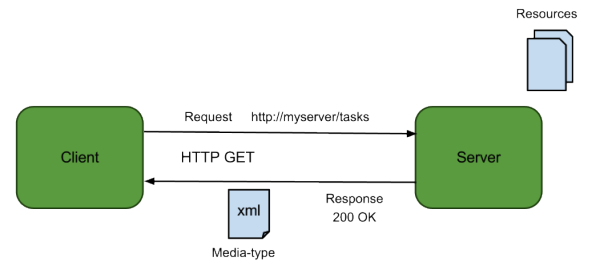

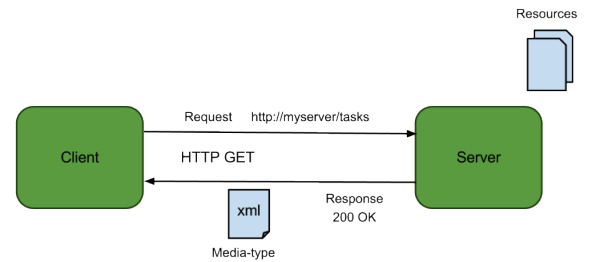
1. Client request the REST service via a valid URL(
Lets say http://host.com/AppName/webapi/myResource 
Because we can request services via URLs we dont need to create additiona hard coded REST clients, just a browser is enough. But if you wannt do much more with URLs and requests there are very very good browser plugins and extensions for chome and FireFox.

2. Application (AppName)gets the request. Actually web.xml in WEB-INF gets and handles the request.
It decides what package to look for (com.kapal.restdemo)

<init-param>
            <param-name>jersey.config.server.provider.packages</param-name>
            <param-value>com.kapal.restdemo</param-value>
</init-param>

And also it does the mapping between URL and resource classes. Here it maps webapi/ any_url_portion with com.kapal.restdemo

<servlet-mapping>
        <servlet-name>Jersey Web Application</servlet-name>
        <url-pattern>/webapi/*</url-pattern>
</servlet-mapping>

3. So the resource we need to look for is myResource.
If there is a class annotated with @Path("myResource"), Jersey will get that class.

package com.kapal.restdemo;

import javax.ws.rs.GET;
import javax.ws.rs.Path;
import javax.ws.rs.Produces;
import javax.ws.rs.core.MediaType;


@Path("myresource")
public class MyResource {

    
    @GET
    @Produces(MediaType.TEXT_PLAIN)
    public String getIt() {
        return "Got it! yeah";
    }
}


Here additional 2 annotations are needed.
@GET - respond to GET HTTP verb
@Produces - Means in what format we should send the response to client.
Typically it can be plain text, or HTML format. But sometime we may need to respond with XML format or JSON.

(MediaType.APPLICATION_XML)
With JDK we have JAXB(Java Architecture for XML Binding). So it is pretty straight foreward to convert Java objects to XML format and vice versa. All we have to do annotate the requires object class as @XmlRootElement


(MediaType.APPLICATION_JSON)
Unfortunately with JDK we dont have a inbuilt support. We need to have a 3rd party support. Jersey also has a JSON library called moxy. You can manually add the .jars or let Maven do it for you. All you need do is add the dependency by uncommenting following dependency portion in pom.xml

<dependency>
            <groupId>org.glassfish.jersey.media</groupId>
            <artifactId>jersey-media-moxy</artifactId>
 </dependency>

Share:

Calling a remote SOAP WS (JAX-WS) from a local client

Lets say a some SOAP service is hosted in a remoter server. We dont want to know its implementation logic, language, platform, server or anything. Thats the beauty of WS. You can call it from any language, platform.

If you can google you can find loads of SOAP services for free. For now I will use http://www.webservicex.net/New/. This just a random choice. This site has loads of web services.

From all of those WS I will chose http://www.webservicex.net/New/Home/ServiceDetail/17. This can basically take a countries name as a string and provide its dialing code, currency, GMT like details.

So first step is to get it's WSDL.
Which is @ http://www.webservicex.net/country.asmx?WSDL

When you look at the end of the WSDL you can see this.


Which means 
Service name = country and its is binded  port = countrySoap

Before going to have a Java client we need to have all the stubs that complies with this WSDL.
we can do that via wsimport tool by JDK. Type this in a bash.

wsimport -keep http://www.webservicex.net/country.asmx?WSDL

-keep arg can keeps the .java files with .class files. What I normally do is after all the files parsed from the WSDL remove all the .class files via rm *.class 

So in our Java main method, we can have a instance of web service and get its binded interface which is at the above mentioned port and access all the web methods via the interface.


import net.webservicex.Country;
import net.webservicex.CountrySoap;

public class Main {

	public static void main(String[] args) {

		// According to WSDL service name is country
		// Create a web service instance
		Country country = new Country();
		
		// According to WSDL this service is binded to countrySoap port
		// So get this service's port
		CountrySoap cs = country.getCountrySoap();
		
		// Now we have the access to services interface
		// We can call its services 
		// We don't need to worry about in and out parameters and data types
		// They are being handled by stubs at client and server end
		// For now lets get the dialing number for any country
		String dialing = cs.getISD("Sri Lanka");
		
		System.out.println(dialing);


	}

}


Result

IMPORTANT
Actually this WS has 2 issues.
  1. It produces the result twice per each response.
  2. The result is not a native String type. It is wrapped around a table. we have to unwrap it first.

Any how Service implementation is beyond our duty and we can call the SOAP WS regardless.


underneath the communication media request is sent as a SOAP mag and response is also received as a SOAP msg.

We request

POST /country.asmx HTTP/1.1
Host: www.webservicex.net
Content-Type: application/soap+xml; charset=utf-8
Content-Length: length

<?xml version="1.0" encoding="utf-8"?>
<soap12:Envelope xmlns:xsi="http://www.w3.org/2001/XMLSchema-instance" xmlns:xsd="http://www.w3.org/2001/XMLSchema" xmlns:soap12="http://www.w3.org/2003/05/soap-envelope">
  <soap12:Body>
    <GetISD xmlns="http://www.webserviceX.NET">
      <CountryName>string</CountryName>
    </GetISD>
  </soap12:Body>
</soap12:Envelope>
We get

HTTP/1.1 200 OK
Content-Type: application/soap+xml; charset=utf-8
Content-Length: length

<?xml version="1.0" encoding="utf-8"?>
<soap12:Envelope xmlns:xsi="http://www.w3.org/2001/XMLSchema-instance" xmlns:xsd="http://www.w3.org/2001/XMLSchema" xmlns:soap12="http://www.w3.org/2003/05/soap-envelope">
  <soap12:Body>
    <GetISDResponse xmlns="http://www.webserviceX.NET">
      <GetISDResult>string</GetISDResult>
    </GetISDResponse>
  </soap12:Body>
</soap12:Envelope>


Share:

How to consume a local SOAP web service (JAX-WS) - Implementation

Lets continue with our example from here and keep things simple and tidy.

Lets say we have a server(A local server for now. ie. localhost). It has a service to add any two numbers. So you have a client who wants to consume that ws. Meaning he frigging needs to add two numbers.

Server side implementation

Add service

You need to have the service now. So write a simple add method in dynamic web project in eclipse. Its is a good idea to add the relevant annotations coz I find it less buggy.
package controller;

import javax.jws.WebMethod;
import javax.jws.WebService;

@WebService(serviceName="MyCalc")
public class Calculator {

 
 @WebMethod
 public int add(int num1, int num2)
 {
  return num1 + num2;
 }
}

WSDL creation

Create a new web service in the same project and create as follows.You can create the WSDL from your add implementation Or you can create the WSDL manually according to add method. ;) 


Deploy and run the web service

Now run the project on the server. Im hoping you have a server created already. And BTW without a server installed you wont be able to create the WSDL even. I have used WildFly 9 to deploy. If all is ok you will be able to see your WSDL at
http://localhost:8080/CalculatorWS/MyCalc?wsdl
[Note: Port and server names can be changed as to how you have configured your sever]

Client implementation

One important thing. Under your web project you -> web content -> wsdl directory you can see your wsdl and its design. So according to following design
MyCalculalator web service is binded to Calculator interface via CalculatorSoapBinding(that little box in the middle). So if we need to access the web service we can access it via Calculator interface which acts as a proxy.

Before we access the web service we need to have our own interface to act as a stub. This stub should also comply with the WSDL also. In a real scenario you ll have to get the WSDL from a UDDI.
So to create the related stubs we will use wsimport tool by JDK.

wsimport -keep http://localhost:8080/CalculatorWS/MyCalc?wsdl
[If you dont add -keep it will generate only .class file and remove the .java files]

Import those files to a normal Java project. So now these stubs are in the controller package.


Now you can access the WS in the main method. In the command line you can see your service call has been executed.

import controller.Calculator;
import controller.MyCalc;

public class Main {

 public static void main (String args[]) 
 {
  
  // Create a web service instance
  MyCalc mycalc = new MyCalc();
  
  // Access that service with the binded port
  Calculator c = mycalc.getCalculatorPort();
  
  // Consume the service via its interface/proxy
  System.out.println(c.add(54, 87));
  
 
 }
 }
Share:

How to consume a remote SOAP web service (JAX-WS)?

For the sake of explaining this scenario we will mix some theoretical aspects with a narration.
Disclaimer: This can be pretty stupid

Lets say this is the time where Mathematics hasn't been born yet. No cool mathematicians are born yet. But still you have numbers. So you dont know how to add or multiply or do anything with  the numbers. All of a sudden you need to add 2 numbers. Gladly there is a far far far away a machine that can add two numbers. So you are in luck.

That machine = Web service

Not so fast. You know that there is a such machine. But how the heck you can find it or frigging locate it. Just because you are such a lucky person, there is a wise old man in your villlage who knows all about every magical machinery crap that exist on this planet. So you can ask the directions to the adding machine.

Wise Old Man = UDDI

Just because you know the machine isnt mean that you can add 2 numbers. There is a specific way to present those 2 numbers to the machine and theres is a specific format that you get the result from the machine. Every machine has a manual ! So if you read the manual you can figure all about the machine.

Machine Manual = WSDL

Here you can parse the WSDL to have related stubs/proxies in 3 ways.

  1. Look at the WS and write the WSDL manually. Thats gonna be preeeeeety HARD.
  2. You can use an IDE like eclipse to do that. (3rd part tools)
  3. Use wsimport utility provided by JDK 6+ versions. https://docs.oracle.com/javase/6/docs/technotes/tools/share/wsimport.html [Note: wsimport <wsdl link> provides class files by deafult because after compilation it removes the .java files. If you want to have .java files add relevenat arguments to wsimport]
So once you know how to read the manual and hopefully you can understand the manual, you can operate it. Meaning you can add your two numbers.

This is just the basic of it. See how it is really done here.

Share:

Jboss hanging up in the startup ???

If you are working with Jboss 7.x and it hanging up in the startup, have no worries. You have a solution.

Reason for this is Jboss 7.x doesn't work with JDK 8.


Yeah its true. I normally work on linux and I have faced the same issue in Jboss 7.0 and 7.1.1 final.
Its a normal problem for windows users as well.
Read this https://developer.jboss.org/message/808212?_sscc=t

You can do 2 thing now.

  1. Downgrade your JDK to 7 or 6 if you really want to keep JBoss 7.x AS.
  2. Keep your JDK same. Upgrade your AS to wildfly. It's the new Jboss.
Share:

Enetrprice Java Bean - bean life cycles

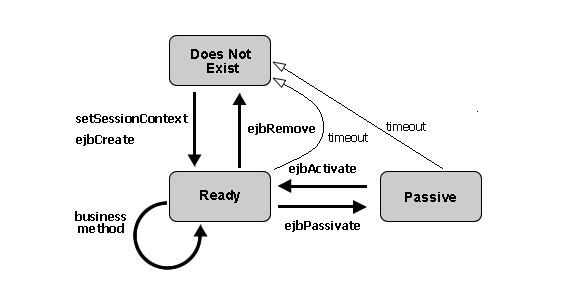
Stateless session bean - life cycle


uncreted state -> active state (setSession() from container and ejbCreate() )
active state -> destroy state (ejbRemove())


Statefull session bean - life cycle

Uncreated state -> Active state (setSession() from container and ejbCreate() )
Active state -> Passive state (ejbPassivate() )
Passive state -> Active state (ejbActivate() , bean can only be invoked when active )
Active state -> Destroy state (ejbRemove() )

Entity bean - life cycle


Uncreated -> Pool state (setEntityContext(), Now entity bean is just created and in a pool. No id is assigned)
Pool state -> Active (create(), ejbActivate(), ejbCreate(). Now it has an id)
Active state -> Pooled state (ejbPassivate(), remove(), ejbRemove() )
Active state -> destroy state (unsetEntityContext())

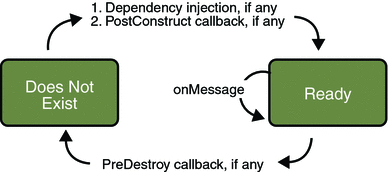
Message driven bean - life cycle

Uncreated -> Active state (setEntityContext(), ejbCreate())
Active state -> Event listening state (onMessage(), bean can react to incoming events to now )
Active state -> destroy state (ejbRemove())
Share:

Enterprice Java Beans on JBoss (Wildfly now)

EJBs are associated with applications and it can do application's work. It's that simple. So these applications have to be deployed on a server. For the server you have various servers to choose.

  • Apche
  • IBM websphere application server
  • JBoss (now called as WildFly)
  • OW2
  • Oracle GlassFish
  • Resin and many more.
But for now we will focus on WildFly server more particularly 9.x.
PS- If you haven't install WildFly  you can do this with ecilpse's servers tab. And configure it with correct HOME_PATH for WildFly.

Before we going down further,lets make clear of this thing.

Session bean:
  • Session beans contain business logic.
  • State-full session beans cant be reused again and again. One instance/session per client. Destroy and re create
  • Stateless sessions beans can be reused and shared across multiple clients
  • Singleton session beans are 1 per application
Entity bean is simply a representation of table raw. Which means it should be uniquely identifiable from other entity bean instances. For this we can use the existing table row primary key(PK). This can be composed of a single primary key or a composition of different primary keys.

Characteristics of entity bean PK
  • It should be a type of integer wrapper class
  • Should be unique
  • Should have proper annotations 
Entity bean:
  • Can maintain its state with a unique primary key. So even in a system shutdown these can be persistent coz it has a unique primary key.
  • At a time can be associated with multiple clients
  • Represents a row in a table. Meaning entity bean and a data source has an association 

Minimum code for a Session bean implementation

package Session;

import java.rmi.RemoteException;

import javax.ejb.EJBException;
import javax.ejb.LocalBean;
import javax.ejb.SessionBean;
import javax.ejb.SessionContext;
import javax.ejb.Stateless;

/**
 * Session Bean implementation class MySessionEJB
 */
@Stateless
@LocalBean
public class MySessionEJB implements SessionBean {

    /**
     * Default constructor. 
     */
    public MySessionEJB() {
    }

 @Override
 public void ejbActivate() throws EJBException, RemoteException {
  
 }

 @Override
 public void ejbPassivate() throws EJBException, RemoteException {
  
 }

 @Override
 public void ejbRemove() throws EJBException, RemoteException {
  
 }

 @Override
 public void setSessionContext(SessionContext arg0) throws EJBException, RemoteException {
  
 }
 
 // additional user defined methods
 public int multiply(int x, int y)
 {
  return x*y;
 }

}


Minimum code for a Entity bean implementation

package Entity;

import java.rmi.RemoteException;

import javax.ejb.EJBException;
import javax.ejb.EntityBean;
import javax.ejb.EntityContext;
import javax.ejb.LocalBean;
import javax.ejb.RemoveException;
import javax.ejb.Stateless;

/**
 * Session Bean implementation class MyEntityBean
 */

public class MyEntityBean implements EntityBean {

    @Id // Indicates this is an ID
 @TableGenerator(name="") // Name of the table
 @Column() // Unique column name
 Integer primaryKey;
 
 public Integer getPrimaryKey()
 {
  return primaryKey;
 }

     /**
     * Default constructor. 
     */
    public MyEntityBean() {
    }

 @Override
 public void ejbActivate() throws EJBException, RemoteException {
  
 }

 @Override
 public void ejbLoad() throws EJBException, RemoteException {
  
 }

 @Override
 public void ejbPassivate() throws EJBException, RemoteException {
  
 }

 @Override
 public void ejbRemove() throws RemoveException, EJBException, RemoteException {
  
 }

 @Override
 public void ejbStore() throws EJBException, RemoteException {
  
 }

 @Override
 public void setEntityContext(EntityContext arg0) throws EJBException, RemoteException {
  
 }

 @Override
 public void unsetEntityContext() throws EJBException, RemoteException {
  
 }

}

Minimum code for a Message bean implementation

package Message;

import javax.ejb.ActivationConfigProperty;
import javax.ejb.MessageDriven;
import javax.jms.Message;
import javax.jms.MessageListener;

/**
 * Message-Driven Bean implementation class for: MyMessageBean
 */
@MessageDriven(
  activationConfig = { @ActivationConfigProperty(
    propertyName = "destinationType", propertyValue = "javax.jms.Queue")
  })
public class MyMessageBean implements MessageListener {

    /**
     * Default constructor. 
     */
    public MyMessageBean() {
    }
 
 /**
     * @see MessageListener#onMessage(Message)
     */
    public void onMessage(Message message) {
        
    }

}


Share: